
Google Ads Tutorial is one of the best starting points for anyone who wants to generate website traffic, leads, or sales through online advertising. Whether you’re a business owner, freelancer, marketer, or beginner, learning Google Ads can help you reach potential customers exactly when they are searching for your products or services.
Unlike traditional advertising, Google Ads allows you to target people based on their search intent, location, device, interests, and many other factors. This means your budget is spent reaching users who are more likely to take action. In this guide, you’ll learn how Google Ads works, how to create your first campaign, avoid common mistakes, and optimize your ads for better results. By the end, you’ll have a clear roadmap to confidently launch and improve your campaigns.
Quick Answer
Google Ads is Google’s online advertising platform that lets businesses display ads on Google Search, YouTube, Gmail, Google Maps, and millions of partner websites. Advertisers bid on keywords or audiences, pay mainly when someone clicks an ad (Pay-Per-Click), and can measure every important result such as clicks, conversions, leads, and sales.
Why Learn Google Ads?
Learning Google Ads offers several advantages over many other marketing channels.
- Reach customers when they are actively searching.
- Control your advertising budget.
- Measure every click and conversion.
- Scale campaigns as your business grows.
- Target local, national, or global audiences.
- Improve brand visibility quickly.
For many businesses, Google Ads complements SEO. While SEO can take months to produce results, Google Ads can start driving qualified traffic as soon as your campaign is approved.
What Is Google Ads?
Google Ads is Google’s advertising platform where businesses pay to show advertisements across Google’s ecosystem.
Your ads can appear on:
- Google Search
- Google Shopping
- YouTube
- Gmail
- Google Display Network
- Google Maps
- Google Discover
- Partner websites
Instead of paying to appear permanently, advertisers participate in an auction every time someone searches or qualifies for an ad placement.
How Google Ads Works
The basic process looks like this:
Understanding the workflow makes the platform much easier to use.
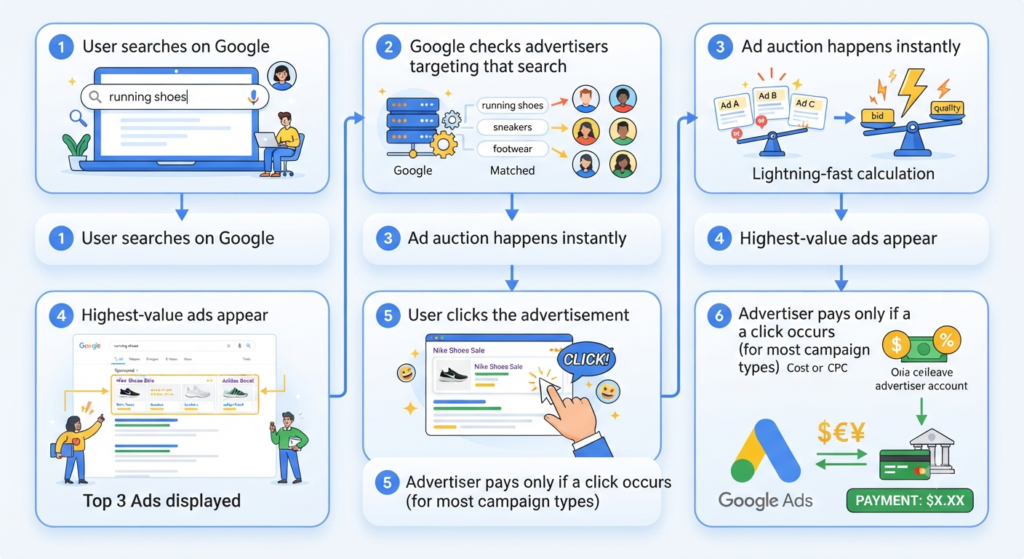
However, winning isn’t only about bidding more money.
Google also considers:
- Ad Quality
- Keyword relevance
- Landing page experience
- Expected click-through rate
- Overall Ad Rank
A highly relevant ad with a moderate bid can often outperform a poorly optimized ad with a larger budget.
Key Google Ads Terminology
Before creating campaigns, become familiar with these important terms.
| Term | Meaning |
| Keyword | The search phrase you want your ads to appear for |
| CPC | Cost Per Click |
| CTR | Click-Through Rate |
| Impression | One time your ad is displayed |
| Conversion | Desired action like a purchase or form submission |
| Quality Score | Google’s rating of your keyword quality |
| Ad Rank | Determines your ad position |
| Landing Page | The page users visit after clicking your ad |
| Bid | Maximum amount you’re willing to pay |
| Campaign | Top-level advertising structure |
| Ad Group | Group of related keywords and ads |
Knowing these terms will help you understand reports and optimize campaigns effectively.
Types of Google Ads Campaigns
Choosing the correct campaign type is one of the most important decisions you’ll make.
1. Search Campaign
Best for:
- Lead generation
- Service businesses
- Local businesses
- High-intent customers
Search ads appear when users actively search on Google.
Example:
A user searches:
“best digital marketing course”
Your advertisement appears above the organic results.
This campaign type is usually the best starting point for beginners because it targets people with strong buying intent.
2. Display Campaign
Display campaigns show visual banner advertisements across millions of websites.
Best for:
- Brand awareness
- Remarketing
- Product visibility
- Large audience reach
Although display campaigns reach many users, they generally have lower purchase intent than search campaigns.
3. Shopping Campaign
Shopping ads display:
- Product image
- Price
- Store name
- Reviews (when eligible)
Ideal for eCommerce businesses selling physical products.
4. Video Campaign
Video campaigns display advertisements on YouTube.
They work well for:
- Brand awareness
- Product demonstrations
- Educational content
- Customer testimonials
5. Performance Max Campaign
Performance Max uses machine learning to serve ads across multiple Google channels using a single campaign.
It can show ads on:
- Search
- Display
- YouTube
- Gmail
- Discover
- Maps
It’s suitable for advertisers with conversion tracking already configured.
6. App Campaign
Designed specifically to promote mobile applications and increase installs or in-app actions.
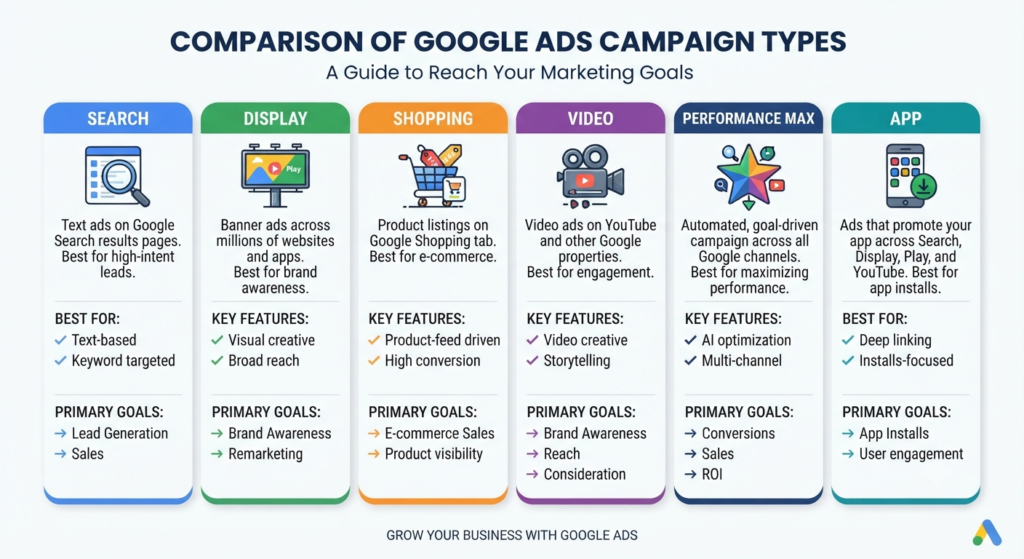
Choosing the Right Campaign Type
| Goal | Recommended Campaign |
| Generate Leads | Search |
| Sell Products | Shopping |
| Build Brand Awareness | Display |
| Promote Videos | Video |
| Increase App Downloads | App Campaign |
| Maximize Overall Reach | Performance Max |
Step-by-Step Google Ads Tutorial
Step 1: Create a Google Ads Account
Visit the official Google Ads platform and sign in using your Google account.
If you’re new, switch to Expert Mode instead of using Smart Mode. Expert Mode provides greater control over campaign settings, bidding, keywords, and reporting.
Step 2: Define Your Campaign Goal
Google will ask you what you want to achieve.
Common goals include:
- Website traffic
- Sales
- Leads
- Product purchases
- Brand awareness
- Local store visits
Choose a goal that aligns with your business objective rather than selecting one just because it appears first.
Step 3: Select Campaign Type
For beginners, a Search Campaign is often the best choice because it targets users who are actively looking for information, products, or services.
Later, you can expand into Display, Shopping, or Performance Max campaigns based on your marketing strategy.
Step 4: Set Your Budget
One of the biggest advantages of Google Ads is budget flexibility.
For beginners:
- Start with a daily budget you’re comfortable testing.
- Increase spending only after identifying profitable campaigns.
- Monitor results regularly instead of assuming higher spending guarantees better performance.
Think of your first budget as an investment in learning and data collection rather than immediate profit.
Step 5: Choose Target Locations
Google Ads lets you target users by:
- Country
- State
- City
- Radius around a business
- Postal code
For local businesses, targeting a smaller geographic area often delivers more relevant traffic and reduces wasted ad spend.
Step 6: Select Your Audience
Depending on the campaign type, you can refine targeting using:
- Age
- Gender
- Household income (where available)
- Interests
- Purchase intent
- Device
- Language
Avoid making your audience too broad initially. A focused audience generally provides clearer performance data and makes optimization easier.
Step 7: Perform Keyword Research
Keyword selection determines when your ads appear.
Look for keywords that closely match what your ideal customers would search for.
Examples:
- Google Ads tutorial
- Learn Google Ads
- Google Ads course
- Google Ads for beginners
- Google Ads training
- PPC advertising guide
- Google Ads campaign setup
- Online advertising tutorial
Also consider long-tail keywords, which often have lower competition and higher intent.
Examples:
- How to create a Google Ads campaign
- Google Ads tutorial for beginners
- Google Ads setup step by step
- Best Google Ads strategy for small business
Step 8: Understand Keyword Match Types
Choosing the right keyword match type helps you control when your ads appear. Many beginners waste budget because they use the wrong match type.
| Match Type | Example | Best For | Reach |
| Broad Match | Google Ads Tutorial | Finding new searches | High |
| Phrase Match | “Google Ads Tutorial” | Balanced targeting | Medium |
| Exact Match | [Google Ads Tutorial] | High-intent searches | Narrow |
Broad Match
Broad Match allows Google to show your ad for related searches.
Example:
Keyword:
Google Ads Tutorial
Your ad may appear for:
- Learn Google Ads
- PPC advertising course
- Online advertising guide
Pros
- Maximum reach
- Finds new keyword opportunities
Cons
- Can trigger irrelevant searches
- May increase wasted spend if not monitored
Phrase Match
Phrase Match shows ads when the search includes the meaning of your keyword.
This is often the best option for beginners because it balances reach and relevance.
Exact Match
Exact Match targets searches with the same meaning or close variations.
It usually provides:
- Better click quality
- Higher conversion potential
- More control over budget
Step 9: Organize Keywords into Ad Groups
Don’t place every keyword into one ad group.
Instead, group similar keywords together.
Example
Ad Group: Google Ads Basics
Keywords:
- Google Ads Tutorial
- Learn Google Ads
- Google Ads Guide
- Google Ads Training
Ad Group: Google Ads Setup
Keywords:
- Google Ads Campaign Setup
- Create Google Ads Campaign
- Google Ads Account Setup
This improves ad relevance and Quality Score.
Step 10: Write High-Converting Ads
Every search ad should answer one question:
“Why should someone click my ad instead of another?”
A simple structure:
Headline 1
Include your main keyword.
Headline 2
Highlight the benefit.
Headline 3
Add trust or urgency.
Description
Explain what users will gain and include a clear call to action.
Example
Headline 1
Google Ads Tutorial for Beginners
Headline 2
Learn Step-by-Step
Headline 3
Start Your First Campaign Today
Description
Learn Google Ads from scratch with this complete beginner-friendly guide. Discover campaign setup, keyword research, bidding, and optimization techniques.
Writing Tips
✔ Include the keyword naturally.
✔ Focus on benefits rather than features.
✔ Add a strong call to action.
✔ Match the ad to the landing page.
Step 11: Create an Effective Landing Page
Even a great ad can fail if the landing page doesn’t meet user expectations.
A good landing page should have:
- Clear headline
- Fast loading speed
- Mobile-friendly design
- Simple navigation
- Relevant content
- Strong call-to-action
- Trust signals (reviews, testimonials, certifications where applicable)
Landing Page Checklist
✔ Matches ad message
✔ Loads quickly
✔ Easy to read
✔ Clear CTA
✔ No unnecessary distractions
✔ Secure HTTPS website
Step 12: Set Up Conversion Tracking
Without conversion tracking, you’re only measuring clicks—not results.
Track actions such as:
- Purchases
- Form submissions
- Phone calls
- Newsletter signups
- Downloads
This data helps identify which keywords and ads are generating real business outcomes.
Step 13: Choose a Bidding Strategy
Google Ads offers several bidding options.
| Strategy | Best For |
| Manual CPC | Beginners learning Google Ads |
| Maximize Clicks | Increasing website traffic |
| Maximize Conversions | Lead generation |
| Target CPA | Stable conversion campaigns |
| Target ROAS | Ecommerce businesses |
Which Should Beginners Choose?
For learning:
Start with Manual CPC or Maximize Clicks.
Once enough conversion data is collected, consider automated bidding strategies.
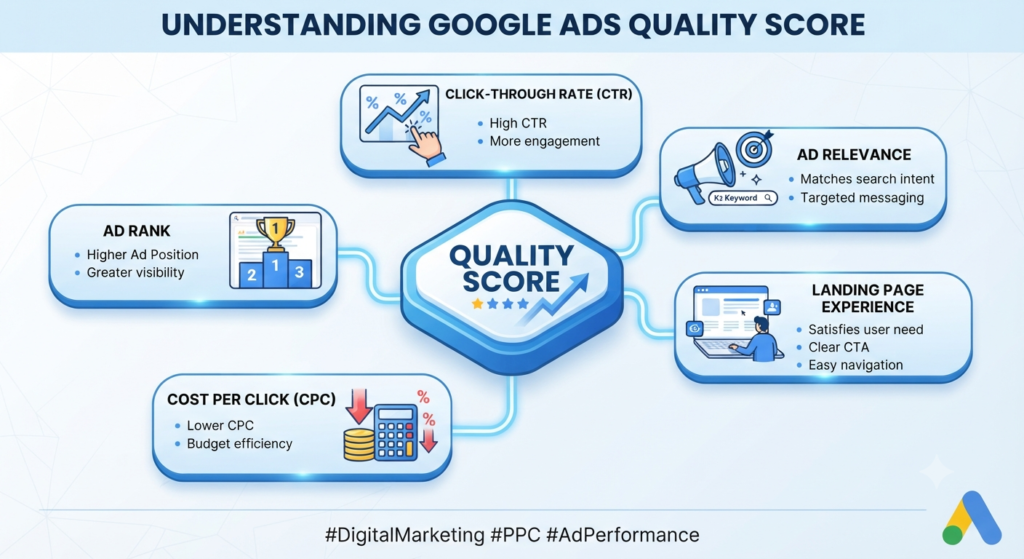
Understanding Quality Score
Quality Score is Google’s estimate of the relevance and quality of your keywords, ads, and landing pages.
It generally depends on:
- Expected Click-Through Rate
- Ad Relevance
- Landing Page Experience
Higher Quality Scores can lead to:
- Better ad positions
- Lower cost per click
- Improved campaign efficiency
How to Improve Quality Score
- Use tightly themed ad groups.
- Include keywords in headlines naturally.
- Improve landing page relevance.
- Increase page speed.
- Write compelling ad copy.
- Remove low-performing keywords.
Google Ads Optimization Workflow
Successful campaigns require ongoing optimization.
Follow this weekly workflow:
Review Search Terms
Look for irrelevant searches and add them as negative keywords.
Pause Poor Keywords
Stop spending on keywords with consistently poor performance.
Improve Ad Copy
Test new headlines and descriptions to improve click-through rates.
Optimize Landing Pages
Update content, improve speed, and simplify forms if conversions are low.
Adjust Bids
Increase bids on high-performing keywords and reduce bids on underperforming ones.
Monitor Conversions
Focus on metrics that align with your business goals rather than vanity metrics like impressions alone.
Key Metrics to Monitor
| Metric | Why It Matters |
| Clicks | Measures traffic |
| Impressions | Shows visibility |
| CTR | Indicates ad relevance |
| CPC | Measures advertising cost |
| Conversions | Tracks business outcomes |
| Conversion Rate | Shows landing page effectiveness |
| Cost Per Conversion | Evaluates efficiency |
| ROAS | Measures return on ad spend |
Common Mistakes to Avoid
Many beginners make the same mistakes, which can quickly consume their budget.
- Choosing overly broad keywords.
- Ignoring negative keywords.
- Sending users to an unrelated landing page.
- Not tracking conversions.
- Increasing budget too quickly.
- Making changes every day without enough data.
- Writing generic ad copy.
- Targeting too many locations at once.
- Ignoring mobile users.
- Forgetting to review search term reports.
Avoiding these mistakes can significantly improve campaign performance.
Pro Tips
- Start with one campaign before expanding.
- Focus on a small group of highly relevant keywords.
- Test multiple ad variations.
- Review campaign performance weekly.
- Pause low-performing ads instead of deleting them immediately.
- Continuously add negative keywords.
- Optimize landing pages alongside ads.
- Use location targeting to reduce wasted spend.
- Let data guide decisions rather than assumptions.
Google Ads Beginner Checklist
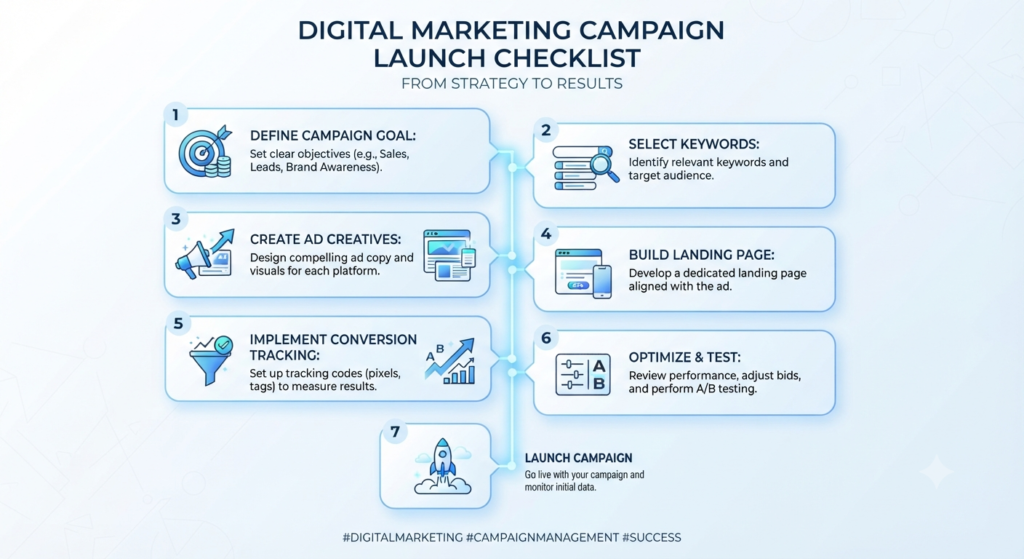
Before launching your campaign, make sure you’ve completed these steps:
✔ Created a Google Ads account
✔ Chosen the correct campaign type
✔ Defined your campaign goal
✔ Set a realistic budget
✔ Selected target locations
✔ Organized keywords into ad groups
✔ Written relevant ad copy
✔ Built a matching landing page
✔ Enabled conversion tracking
✔ Reviewed campaign settings
✔ Added negative keywords
✔ Tested the user experience on mobile devices
Frequently Asked Questions
Is Google Ads difficult to learn?
No. The basics can be learned in a few days with consistent practice. Mastering optimization takes more time because it involves analyzing data and refining campaigns.
How much should beginners spend on Google Ads?
Start with a budget you are comfortable testing. Focus on gathering meaningful performance data before increasing your spend.
Can I use Google Ads without a website?
Some campaign types support alternatives such as phone calls or app promotions, but a well-designed website or landing page generally provides a better user experience and more conversion opportunities.
Is Google Ads better than SEO?
They serve different purposes. Google Ads can generate traffic quickly, while SEO helps build long-term organic visibility. Many businesses use both together.
How long does it take to see results?
You can start receiving impressions and clicks shortly after your campaign is approved. However, optimization usually requires ongoing testing and analysis over time.
Conclusion
Learning this Google Ads Tutorial is one of the most valuable steps you can take to build practical digital marketing skills and achieve measurable business results. By understanding campaign types, keyword research, bidding strategies, ad creation, and performance optimization, you can create campaigns that align with your goals and budget.
Success with Google Ads comes from continuous improvement rather than a one-time setup. Regularly review your campaigns, test new ideas, analyze performance data, and make informed adjustments. As the digital landscape constantly evolves with shifting consumer behaviors and advancing ad technologies, staying adaptable is crucial for maintaining a competitive edge. Embracing a mindset of lifelong learning enables you to leverage new platform updates, AI-driven targeting features, and innovative ad formats as soon as they roll out. Furthermore, pairing your paid search efforts with a robust organic SEO strategy creates a dominant and comprehensive online presence.
Beyond technical execution, mastering paid advertising requires a deep appreciation for consumer psychology and the customer journey. Every search query reflects an underlying intent, whether someone is looking for quick information, comparing options, or ready to make an immediate purchase.
Tailoring your messaging and landing page experiences to address these distinct stages of the funnel dramatically improves conversion rates and maximizes return on ad spend. Ultimately, consistency and patience are your greatest allies; high-performing accounts are built over time through meticulous data analysis, strategic budget reallocation, and a deep understanding of audience needs. With a structured approach and the knowledge gained from this Google Ads Tutorial, you can confidently build campaigns that generate qualified traffic, quality leads, and long-term business growth.