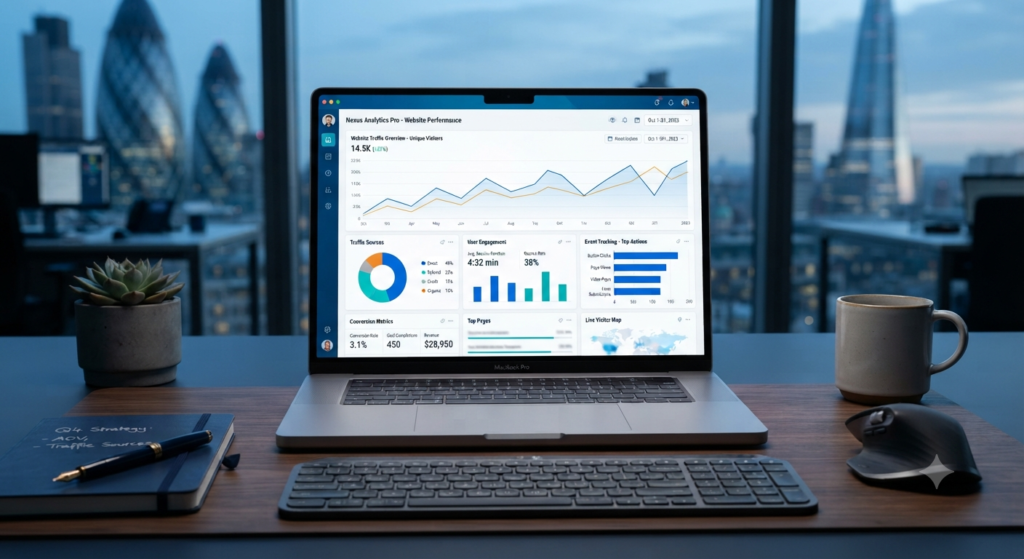

Google Analytics 4 is one of the most powerful tools for understanding how visitors interact with your website or mobile app. Whether you run a business website, an e-commerce store, a blog, or a digital marketing campaign, making informed decisions requires accurate data. Instead of relying on assumptions, GA4 provides insights into user behavior, traffic sources, conversions, engagement, and customer journeys, helping you improve your marketing strategy and business performance.
Unlike previous versions of Google Analytics, Google Analytics 4 uses an event-based measurement model. Rather than focusing mainly on pageviews and sessions, it records user interactions such as clicks, scrolls, video engagement, purchases, and file downloads as events. This approach provides a more complete understanding of how users interact with your digital properties across different devices and platforms.
Businesses today invest in SEO, Google Ads, email marketing, social media, and content marketing to attract visitors. However, without proper measurement, it is difficult to know which marketing channels deliver the best results. GA4helps identify successful campaigns, optimize user experience, measure conversions, and allocate marketing budgets more effectively.
This comprehensive guide explains everything beginners need to know about GA4, including its features, setup process, reports, event tracking, conversion measurement, best practices, and common mistakes. By the end of this guide, you’ll understand how to use GA4 to make data-driven decisions that support long-term business growth.
Quick Answer
Google Analytics 4 is Google’s latest web and app analytics platform that tracks user interactions using an event-based data model. It helps businesses measure website traffic, user engagement, marketing performance, and conversions, allowing them to make informed decisions based on real user behavior.
Why GA4 Matters
Understanding how visitors interact with your website is essential for improving marketing performance and customer experience. Google Analytics 4 provides the insights needed to identify what is working, what needs improvement, and where growth opportunities exist.
A well-configured Google Analytics 4 property helps businesses:
- Measure website and app traffic
- Understand user behavior
- Track marketing campaign performance
- Monitor conversions
- Improve customer experience
- Optimize digital marketing strategies
- Support data-driven business decisions
- Increase return on marketing investment
Instead of guessing why users leave or convert, businesses can use reliable data to improve their websites and campaigns.
What Is Google Analytics 4?
Google Analytics 4 (GA4) is the latest generation of Google’s analytics platform designed to measure user activity across websites and mobile applications.
Unlike earlier versions that focused primarily on sessions and pageviews, Google Analytics 4 tracks individual user interactions as events.
Examples of events include:
- Page views
- Button clicks
- Video plays
- Scroll tracking
- File downloads
- Form submissions
- Purchases
- Sign-ups
- Outbound link clicks
This event-based approach provides a more flexible and detailed understanding of user engagement.
How Google Analytics 4 Works
Google Analytics 4 collects data whenever users interact with your website or app.
The process typically follows these stages:
User Visits Website
↓
Tracking Code Records Activity
↓
Events Are Collected
↓
Data Is Processed
↓
Reports Are Generated
↓
Insights Are Analyzed
↓
Marketing Decisions Improve
↓
Website Performance Increases
By analyzing these reports, businesses can continuously improve customer experiences and marketing effectiveness.
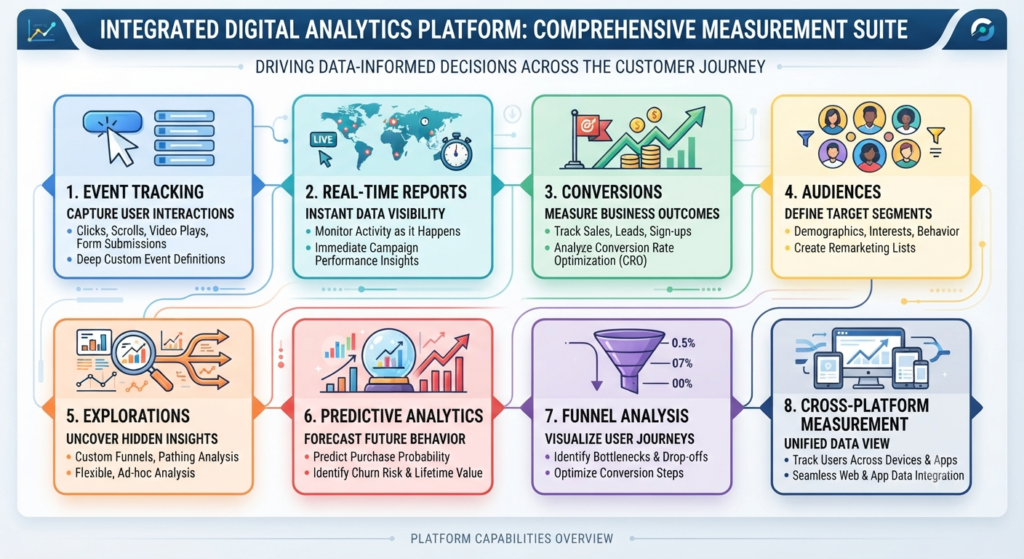
Key Features of Google Analytics 4
Google Analytics 4 introduces several powerful features that support modern digital marketing.
| Feature | Purpose |
|---|---|
| Event-Based Tracking | Measures user interactions |
| Cross-Platform Measurement | Tracks websites and apps together |
| Real-Time Reporting | Monitor live website activity |
| Conversion Tracking | Measure business goals |
| Audience Building | Create user segments |
| Predictive Insights | Identify potential customer behavior |
| Funnel Exploration | Analyze customer journeys |
| Custom Reports | Build personalized dashboards |
These features help businesses gain deeper insights into user behavior compared to traditional analytics platforms.
Benefits of Google Analytics 4
Using Google Analytics 4 provides several long-term advantages for businesses.
Better Understanding of Users
GA4 records how visitors interact with different pages, products, and content, helping businesses identify customer preferences.
Improved Marketing Decisions
Marketing campaigns can be evaluated based on actual performance instead of assumptions, allowing businesses to invest in channels that produce better results.
Enhanced Conversion Tracking
Businesses can measure important actions such as purchases, registrations, downloads, and contact form submissions.
Cross-Device Measurement
Users often switch between mobile phones, tablets, and desktop computers. Google Analytics 4 provides a more complete view of these customer journeys.
Better Privacy Controls
Modern privacy regulations continue to evolve. Google Analytics 4 includes features designed to support more privacy-conscious measurement practices while helping businesses collect valuable insights responsibly.
Google Analytics 4 vs Universal Analytics
Although Universal Analytics has been replaced by GA4, understanding the differences helps explain why the new platform works differently.
| Universal Analytics | Google Analytics 4 |
|---|---|
| Session-based model | Event-based model |
| Limited cross-device tracking | Better cross-platform tracking |
| Focus on pageviews | Focus on user interactions |
| Fixed reporting structure | Flexible reporting |
| Less predictive analysis | Built-in predictive insights |
| Older measurement approach | Modern analytics architecture |
The event-based model makes Google Analytics 4 more adaptable to today’s digital environments.
Step 1: Create a Google Analytics 4 Property
The first step is creating a new Google Analytics 4 property within your Google Analytics account.
Basic setup includes:
- Create a Google Analytics account (if needed)
- Add a new GA4 property
- Enter your website details
- Choose your reporting time zone
- Select your business category
- Configure data sharing settings
Once the property is created, you’ll receive a Measurement ID used during installation.
Step 2: Install Google Analytics 4
Your website must include the Google Analytics 4 tracking code so user interactions can be recorded.
Common installation methods include:
- Website code implementation
- Content Management System (CMS) plugins
- Google Tag Manager
- Website builder integrations
After installation, verify that data is being collected correctly before making business decisions based on reports.
Step 3: Configure Data Streams
A data stream defines where your analytics data comes from.
GA4 supports:
- Website data streams
- Android app data streams
- iOS app data streams
Each stream collects user activity while keeping reports organized inside the same Google Analytics 4 property.
Step 4: Understand Events
Events are the foundation of Google Analytics 4.
Common automatically collected events include:
- page_view
- session_start
- first_visit
- user_engagement
Recommended custom events may include:
- add_to_cart
- purchase
- sign_up
- generate_lead
- file_download
- contact_form_submit
Proper event tracking allows businesses to measure actions that directly support their goals.
Step 5: Set Up Conversions
Conversions represent the most valuable actions visitors complete.
Examples include:
- Product purchases
- Newsletter subscriptions
- Quote requests
- Contact form submissions
- Appointment bookings
- Account registrations
Marking important events as conversions helps Google Analytics 4 generate reports focused on business outcomes rather than only traffic numbers.
Step 6: Explore Real-Time Reports
The Real-Time report allows you to monitor website activity as it happens.
You can view:
- Active users
- Traffic sources
- Current pages
- Events
- Geographic locations
- Devices
- Conversions occurring in real time
This report is particularly useful when testing tracking implementations or monitoring new marketing campaigns.
Step 7: Understand Acquisition Reports
Acquisition reports explain where your visitors come from.
Traffic sources commonly include:
- Organic Search
- Direct Traffic
- Paid Search
- Social Media
- Referral Websites
- Email Marketing
- Display Advertising
Analyzing acquisition reports helps identify which marketing channels contribute most effectively to your business goals and improves your overall Google Analytics 4 strategy.
Step 8: Analyze Engagement Reports
Engagement reports help you understand how users interact with your website after they arrive. Instead of focusing only on traffic numbers, GA4 measures whether visitors actively engage with your content.
Key engagement metrics include:
- Engaged sessions
- Average engagement time
- Events per session
- Page views
- Landing pages
- Scroll activity
- Video engagement
- File downloads
High engagement often indicates that your content is relevant, easy to navigate, and valuable to users.
Step 9: Measure Conversions and Business Goals
Traffic alone does not guarantee business success. The real value of Google Analytics 4 comes from measuring actions that contribute to your objectives.
Common business conversions include:
- Product purchases
- Lead form submissions
- Newsletter subscriptions
- Appointment bookings
- Demo requests
- Contact inquiries
- Account registrations
Monitoring conversions helps determine whether your website is achieving meaningful business outcomes rather than simply attracting visitors.
Step 10: Build Audiences
Audience segmentation allows businesses to group users based on shared characteristics and behaviors.
Examples of useful audiences include:
- New visitors
- Returning visitors
- High-value customers
- Cart abandoners
- Frequent purchasers
- Mobile users
- Organic search visitors
- Users from specific countries
Creating audiences in Google Analytics 4 supports personalized marketing campaigns and improves advertising performance when integrated with other Google products.
Step 11: Use Explorations for Advanced Analysis
The Explorations section provides flexible reporting beyond standard dashboards.
Popular exploration techniques include:
- Funnel exploration
- Path exploration
- Segment overlap
- Cohort analysis
- User lifetime analysis
- Free-form reports
These reports help businesses identify user behavior patterns, conversion bottlenecks, and opportunities for website improvements.
Step 12: Track Marketing Campaigns with UTM Parameters
UTM parameters allow you to identify where website visitors come from and evaluate campaign performance accurately.
Common UTM parameters include:
- Source
- Medium
- Campaign
- Content
- Term
Using consistent UTM naming conventions helps Google Analytics 4 organize campaign data more effectively, making marketing performance easier to evaluate.
Step 13: Integrate Google Analytics 4 with Other Tools
GA4 becomes even more powerful when connected with complementary marketing platforms.
Useful integrations include:
- Google Ads
- Google Search Console
- Google Tag Manager
- Google Merchant Center
- Looker Studio
- BigQuery (where applicable)
These integrations provide a more complete picture of marketing performance and customer behavior.
Step 14: Monitor Key Performance Metrics
Tracking the right metrics helps businesses focus on meaningful improvements rather than vanity numbers.
| Metric | Why It Matters |
|---|---|
| Users | Total visitors |
| New Users | Audience growth |
| Sessions | Website activity |
| Engagement Rate | User interaction quality |
| Average Engagement Time | Content effectiveness |
| Event Count | User actions |
| Conversions | Business success |
| Revenue | Financial performance |
| Traffic Sources | Marketing effectiveness |
Review these metrics regularly to support data-driven decision-making.
Step 15: Continuously Optimize Your Website
Analytics only creates value when insights lead to action.
Use Google Analytics 4 data to:
- Improve landing pages
- Update low-performing content
- Simplify navigation
- Increase page speed
- Optimize mobile usability
- Improve conversion funnels
- Test new layouts
- Enhance calls to action
Small improvements based on accurate data often produce meaningful long-term business growth.
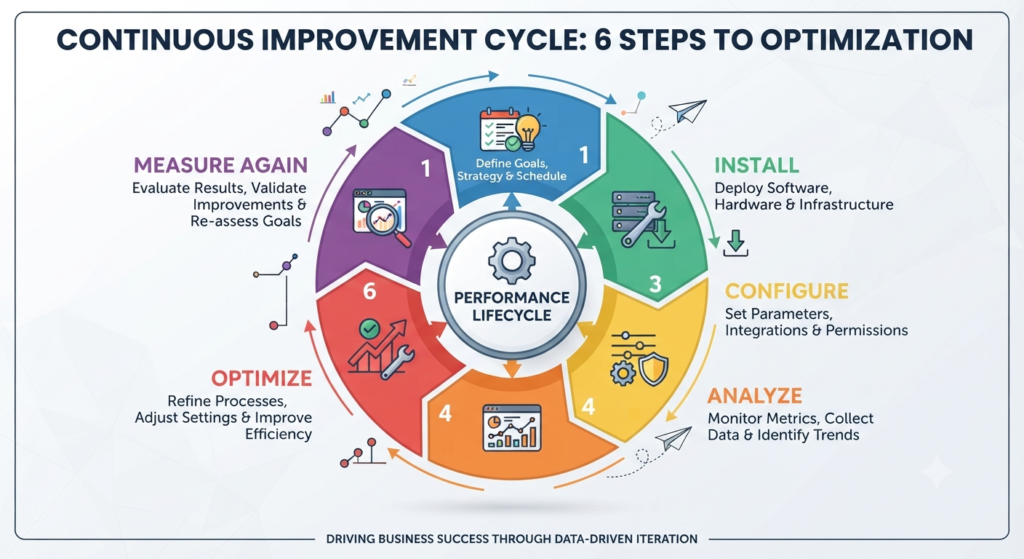
Google Analytics 4 Implementation Framework
Follow this structured workflow for successful implementation.
Plan
Define business goals and key performance indicators.
Install
Set up your GA4 property and verify data collection.
Configure
Create events, conversions, and audiences.
Analyze
Review reports regularly to identify trends and opportunities.
Optimize
Improve your website and marketing campaigns using collected insights.
Measure Again
Monitor results after changes to confirm improvements.
Following this cycle helps businesses maximize the value of Google Analytics 4 over time.
Standard Reports vs Explorations
| Standard Reports | Explorations |
|---|---|
| Easy to access | Highly customizable |
| Best for everyday monitoring | Best for detailed analysis |
| Predefined dashboards | Flexible visualizations |
| Suitable for beginners | Suitable for advanced users |
| Quick insights | Deep behavioral analysis |
Both reporting methods complement each other and provide valuable business insights.
30-Day Google Analytics 4 Learning Plan
Week 1
- Create your GA4 property
- Install tracking
- Verify data collection
- Explore Real-Time reports
Week 2
- Configure events
- Set up conversions
- Build custom audiences
- Review acquisition reports
Week 3
- Analyze engagement reports
- Learn Explorations
- Connect Search Console
- Connect Google Ads if applicable
Week 4
- Review campaign performance
- Optimize landing pages
- Monitor conversions
- Create monthly reporting dashboards
Following a structured learning plan makes GA4 easier to understand and apply effectively.
Common Mistakes to Avoid
Avoid these common Google Analytics 4 mistakes:
- Installing tracking incorrectly
- Not verifying data collection
- Tracking too many unnecessary events
- Ignoring conversion setup
- Forgetting UTM parameters
- Not filtering internal traffic
- Making decisions based on very small data samples
- Ignoring engagement metrics
- Failing to review reports regularly
- Collecting data without taking action
Correcting these mistakes improves reporting accuracy and business decision-making.
Pro Tips
- Define business goals before configuring events.
- Review reports weekly instead of waiting for monthly summaries.
- Keep event naming consistent across your website.
- Monitor both traffic quality and conversion performance.
- Use Explorations to investigate unexpected trends.
- Connect Google Search Console for SEO insights.
- Track marketing campaigns using standardized UTM parameters.
- Continuously refine dashboards based on business priorities.
Google Analytics 4 Checklist
Before relying on your reports, confirm that you have:
✔ Created a GA4 property
✔ Installed tracking correctly
✔ Verified event collection
✔ Configured conversions
✔ Built custom audiences
✔ Linked Google Search Console
✔ Connected Google Ads (if applicable)
✔ Added UTM parameters to campaigns
✔ Enabled internal reporting processes
✔ Scheduled regular performance reviews
✔ Documented key business metrics
✔ Planned ongoing optimization
Frequently Asked Questions
What is GA4?
Google Analytics 4 is Google’s latest analytics platform that tracks user interactions across websites and mobile apps using an event-based measurement model.
Is Google Analytics 4 free?
Yes. Google provides a free version of Google Analytics 4 suitable for most businesses, while enterprise organizations may choose premium analytics solutions depending on their requirements.
Why did Google replace Universal Analytics?
Universal Analytics was designed primarily around sessions and pageviews. Google Analytics 4 uses an event-based model that better reflects modern user behavior across multiple devices and platforms.
What are events in GA4?
Events are recorded user interactions such as page views, clicks, purchases, downloads, video plays, and form submissions.
Do beginners need GA4?
Yes. Beginners can use Google Analytics 4 to understand website performance, monitor traffic, measure marketing effectiveness, and improve user experience through data-driven decisions.
Conclusion
Google Analytics 4 has become an essential tool for businesses, marketers, bloggers, and website owners who want to understand user behavior and make informed decisions based on reliable data. By tracking events, monitoring conversions, analyzing traffic sources, and measuring engagement, GA4 provides a comprehensive view of how visitors interact with your digital properties. These insights help businesses improve marketing strategies, enhance user experiences, and achieve measurable growth.
One of the greatest strengths of GA4 is its flexibility. Its event-based measurement model allows businesses to track meaningful user interactions across websites and mobile applications while adapting to evolving privacy expectations. When combined with tools such as Google Search Console, Google Ads, and Google Tag Manager, GA4 becomes a powerful platform for evaluating marketing performance and optimizing customer journeys.
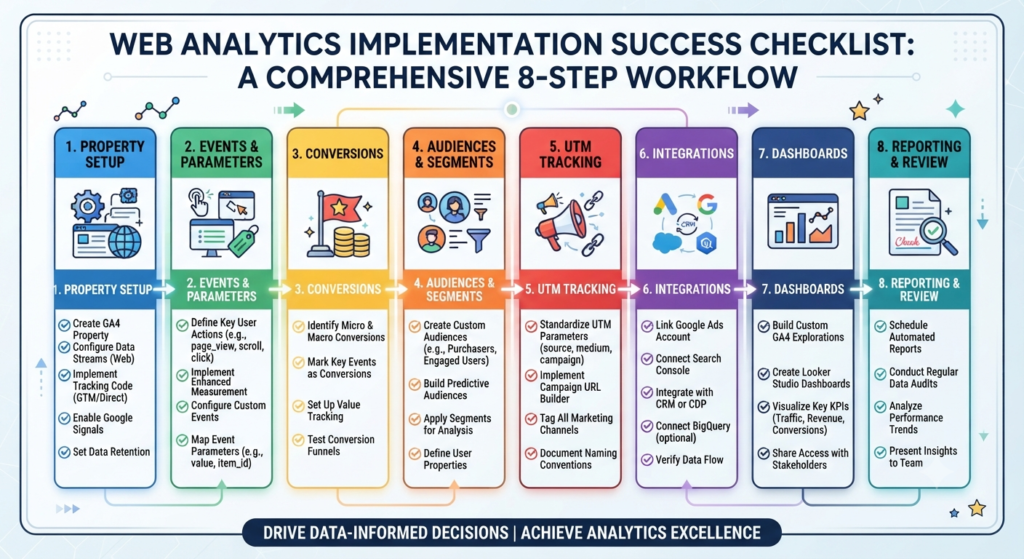
To truly maximize the value of this platform, organizations must adopt a strategic and systematic approach to data collection and analysis. This begins with a properly structured web analytics implementation workflow, starting with robust property setup and data stream configuration. Defining key user actions as custom events, setting up value tracking, and utilizing enhanced measurement ensure that every critical click, scroll, and video play is accurately recorded. Furthermore, standardizing UTM parameters across all marketing campaigns allows teams to precisely attribute traffic sources and identify which channels deliver the highest quality visitors.
Beyond initial setup, successful digital analysis requires segmentation and audience creation. By building custom and predictive audiences based on user behavior—such as identifying potential churn risks or high-value purchasers—marketeers can tailor retention campaigns and remarketing lists effectively. Integrating GA4 with advanced tools like BigQuery also enables data teams to run complex machine learning queries, perform custom funnel pathing, and uncover hidden behavioral trends that standard user interfaces might overlook.
Success with GA4 depends on more than simply installing the tracking code. Businesses should regularly review reports, configure meaningful events and conversions, analyze engagement trends, and use insights to improve website performance. Continuous testing and optimization based on real user behavior often produce better long-term results than relying on assumptions. Establishing automated scheduled reporting and conducting routine data audits ensures that stakeholders across the organization always have access to clean, reliable insights.
Ultimately, organizations that consistently use GA4 to guide decision-making are better positioned to improve customer experiences, increase conversions, maximize marketing return on investment, and build sustainable digital growth. Embracing this data-driven mindset transforms raw numbers into strategic advantages, allowing businesses to adapt dynamically to a competitive digital landscape.